
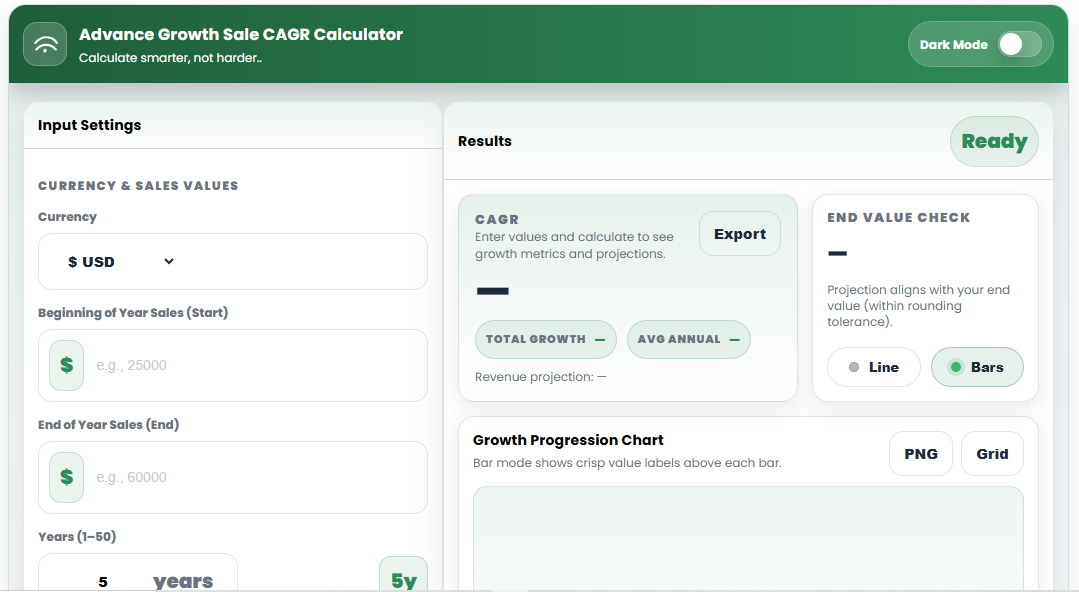

How to Use a CAGR Calculator
(Step-by-Step Guide)
Understand Growth Clearly with a Compound Annual Growth Rate Calculator
A CAGR (Compound Annual Growth Rate) calculator helps you measure the average annual growth rate of a value over time, assuming the growth compounds evenly. It is widely used in business, finance, investing, and performance analysis.
In this guide, you’ll learn what CAGR is, why it matters, and exactly how to use a CAGR calculator correctly, even if you have no finance background.
What Is CAGR?
CAGR stands for Compound Annual Growth Rate. It shows the steady annual rate at which a value would have grown if it increased at the same rate every year.
Instead of showing ups and downs, CAGR provides a single, smooth growth rate that makes comparison easy.
Example:
If your revenue grows unevenly over 5 years, CAGR answers this question:
At what constant rate did my revenue grow each year on average?
Why Use a CAGR Calculator?
Manually calculating CAGR can be confusing, especially when working with longer time periods or projections. A CAGR calculator helps you:
Avoid math errors
Save time
Instantly compare growth rates
Visualize growth trends
Create clean data for reports and presentations
What You Need Before Using a CAGR Calculator
Before using the calculator, make sure you have:
Starting Value (initial amount)
Ending Value (final amount)
Time Period (number of years)
That’s it. No advanced financial knowledge required.
Step-by-Step: How to Use a CAGR Calculator
Step 1: Enter the Starting Value
This is the value at the beginning of the period.
Examples:
Starting revenue
Initial investment amount
Number of users at the start
Step 2: Enter the Ending Value
This is the value at the end of the selected period.
Examples:
Current revenue
Final investment value
Users at the end of the period
Step 3: Enter the Time Period (Years)
Enter the total number of years between the starting and ending values.
For example:
3 years
5 years
10 years
Step 4: Choose Projection Mode (Optional)
Many CAGR calculators allow you to choose:
Yearly projections – for annual growth breakdown
Quarterly projections – for more detailed forecasting
(Note: CAGR itself remains an annual rate.)
Step 5: Click Calculate
Once you click Calculate, the tool will instantly display:
CAGR percentage
Total growth percentage
Average annual growth
Projection table
Growth chart (if available)
How to Read CAGR Results
CAGR (%)
This is the main result. It tells you the average annual growth rate, including compounding.
Total Growth (%)
Shows how much the value increased overall from start to end.
Projection Table
Displays estimated values for each year (or quarter) based on CAGR.
This is useful for:
Forecasting
Business planning
Presentations
Practical Examples of Using CAGR
1. Business Revenue Growth
Use CAGR to compare revenue growth over multiple years, even if growth was uneven.
2. Investment Performance
CAGR helps compare investments with different timeframes fairly.
3. User or Customer Growth
Track how fast your user base is growing over time.
4. Sales Performance
Measure long-term sales trends without short-term noise.
CAGR vs Average Growth Rate
Many people confuse CAGR with simple average growth, but they are not the same.
| Metric | Difference |
|---|---|
| Average Growth | Simple mean, ignores compounding |
| CAGR | Accounts for compounding, more accurate |
CAGR is usually the better metric for long-term analysis.
Common Mistakes to Avoid
Using CAGR for very short periods without context
Ignoring year-to-year volatility
Comparing CAGR across unrelated industries
Treating CAGR as a guaranteed future growth rate
CAGR is a measurement tool, not a prediction.
When CAGR May Not Be Ideal
Highly volatile data
Very short time periods
One-time spikes or drops
In such cases, combine CAGR with:
Year-over-year growth
Revenue trends
Other financial ratios
Final Tips for Using a CAGR Calculator Effectively
Always double-check input values
Use consistent time periods when comparing
Combine CAGR with charts for better understanding
Use it as a benchmark, not a promise
Use Our Free CAGR Calculator
To calculate CAGR instantly with projections and charts, try the free CAGR Calculator on AurexToolz.
It’s fast, accurate, and requires no sign-up.
Conclusion
A CAGR calculator is one of the simplest yet most powerful tools for understanding long-term growth. By using it correctly, you can analyze performance, compare results, and make better business or financial decisions with confidence.