

HTML CSS Formatter
(Format, Minify, and Validate Code Online)
An HTML CSS Formatter is an online tool that helps developers format, clean, and optimize HTML and CSS code for better readability and performance. It allows users to automatically indent code, remove unnecessary spaces, and validate structure without manual effort.
This tool is especially useful for developers who work with large code blocks, ensuring clean formatting and consistent styling across projects.
What is an HTML CSS Formatter?
An HTML CSS Formatter is a utility that organizes HTML and CSS code into a readable and structured format. Proper formatting makes code easier to understand, debug, and maintain.
The formatter applies consistent indentation, spacing, and line breaks while preserving the original code logic. It can also minify code by removing unnecessary characters to reduce file size.
How Does the Tool Work?
The HTML CSS Formatter analyzes the pasted code and detects whether it is HTML or CSS automatically. Based on the selected action, it formats or minifies the code using standard formatting rules.
The tool processes code instantly in the browser and displays the formatted output without storing any data.
How to Use the HTML CSS Formatter
Using the HTML CSS Formatter is simple and quick.
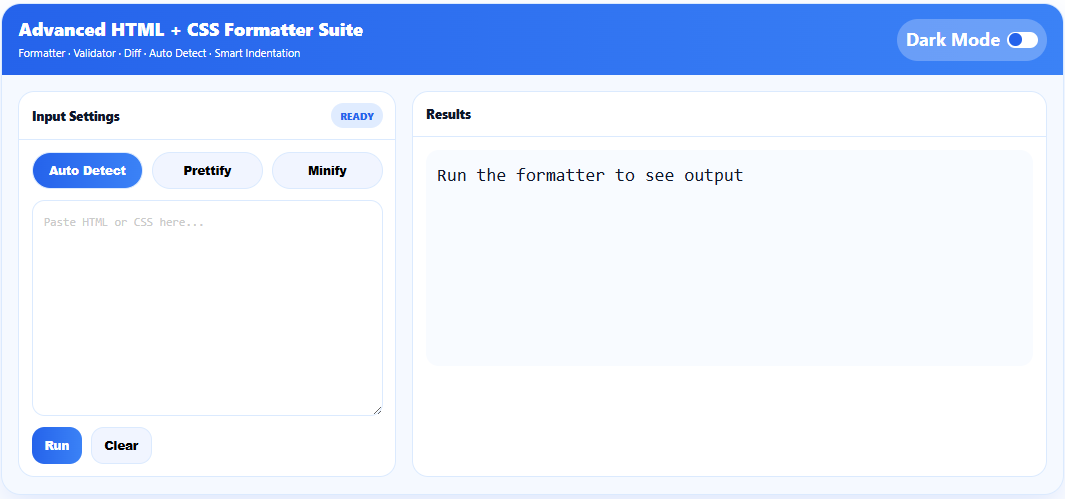
Paste your HTML or CSS code into the input box.
Choose auto detect, prettify, or minify mode.
Click the run button to format the code.
View the formatted or minified output instantly.
This process helps improve code readability and optimization in seconds.
Features
The HTML CSS Formatter supports automatic language detection and smart indentation. It allows users to format messy code into a clean structure and minify code for production use.
The tool also supports validation and diff-style formatting, making it suitable for both development and deployment workflows.
Why Use This Tool
Using an HTML CSS Formatter improves code clarity and reduces errors. Cleanly formatted code is easier to debug, maintain, and collaborate on.
The formatter saves time, eliminates manual formatting, and ensures consistent styling across projects.
Who Should Use This Tool?
The HTML CSS Formatter is useful for web developers, frontend engineers, designers, students, and anyone working with HTML or CSS. Beginners can use it to learn proper formatting, while professionals use it to clean and optimize production code.
Benefits of Formatting HTML and CSS Code
Formatted HTML and CSS code improves readability and reduces the chance of syntax errors. Minified code helps improve website performance by reducing file size and load time.
Using a formatter also ensures consistency across teams and projects.
Important Disclaimer
The HTML CSS Formatter processes code based on standard formatting rules. While it helps improve structure and readability, users should review formatted output before deploying it in production environments.
Frequently Asked Questions (FAQs)
What is an HTML CSS Formatter?
An HTML CSS Formatter is a tool that formats and organizes HTML and CSS code into a clean and readable structure.
Can this tool minify code?
Yes, the tool can minify HTML and CSS by removing unnecessary spaces and line breaks.
Does the formatter validate code?
The formatter checks structure and formatting, but it does not replace full browser-based validation.
Is this HTML CSS Formatter free to use?
Yes, this tool is completely free and does not require registration.
Is my code stored?
No, all formatting happens in your browser and the code is not saved.
Why Use AurexToolz HTML CSS Formatter?
AurexToolz provides a fast and reliable HTML CSS Formatter that works directly in your browser. It supports auto detection, prettify, and minify modes with a clean interface and no sign-up required.